See all Windows 11 network data usage

Windows 11 (and possibly previous versions of windows) have a data usage view built into the advanced network settings view.

This feature allows users to monitor and manage their data usage on both Wi-Fi and wired connections, and I assume also data connections if your device can be connected via a SIM.

The Data usage page only allows you to see the current usage of networks that you are connected to, and doesn’t allow you to get a view of the whole picture.
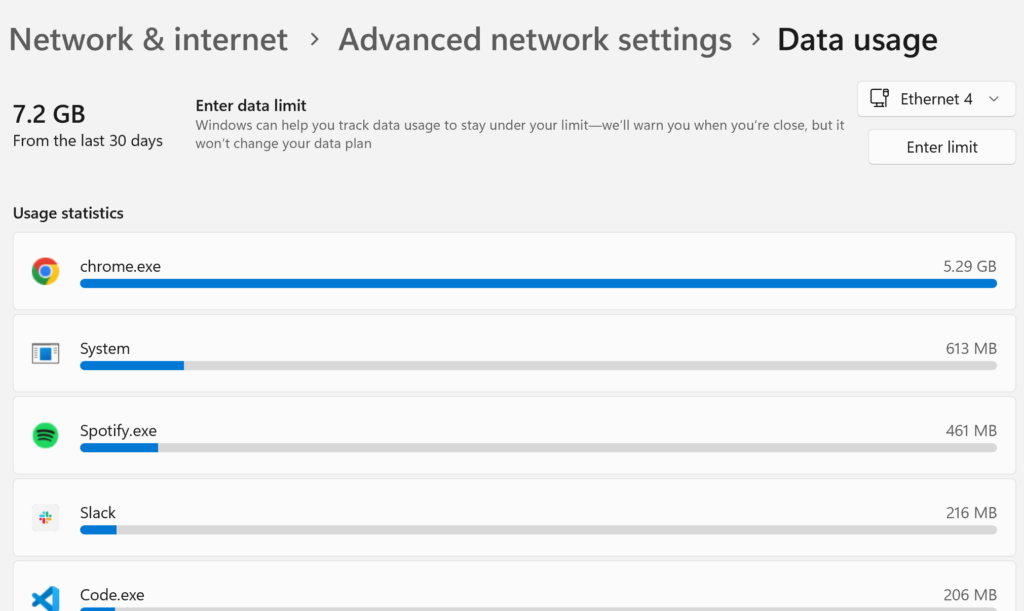
For example, my current “Ethernet 4” usage is 7.2GB in the last 30 days, and the current Wi-Fi network that I am on has 97.1GB usage in the last 30 days.

However, I spend lots of time on other networks, and would love to know my overall data usage in the past 30 days.

Where is the data?

I figured all of the data was stored somewhere on disk, the real questions was where.

After a fair bit of googling I came accros “SRUM” or “System Resource Usage Monitor”, and “SRUDB.dat” referenced quite a lot:

Read more

Windows 11 OpenSSH agent to WSL2

I briefly touched on my OpenSSH agent to WSL2 solution back in 2021. Today find myself setting up a new Windows 11 laptop and running into a couple of different issues, and ultimately using a slightly different solution than before, so here is the short writeup glossing over the areas that lead me to get a little stuck, and hopefully outlining a good set of commands.

In my old .bashrc file, I found a comment linking me to the rupor-github/wsl-ssh-agent GitHub repository which was my first set of reading, specifically the WSL2 compatibility section. The main sticking issue for me out of the box was a miss match in the OpenSSH version between Windows and WSL2, with Windows starting on 8.6 but WSL2 with Ubuntu starting on 8.9. This lead to errors such as:

  • Error connecting to agent: No such file or directory
  • error fetching identities: invalid format
  • Could not open a connection to your authentication agent.

And more…

Read more

sudo / elevate on Windows 11

Windows has never had a native sudo or elevation feature.

Of course if you write the correct Power Shell commands you can make this happen, but what we really want is convenience.

There are various packages around to help out and various ways to install them.

And in Windows 11 with a new package manager, installing one of them as never been so easy.

Read more