I’ve been trying a slightly different setup for working with Codex, give it a VM, connect to it remotely, and let it get on with setting up a development environment and making changes. Mainly so that I could trial this sort of more remote development from less powerful devices than my main daily driver, maybe even my phone! I did a bunch of research, and the easiest service to get off the ground with seemed to be boxd.sh.
One of the reasons for experimenting is disk space. The cloud environments that you can use with Codex / ChatGPT have had around 20 or 30 GB available, which can get rather tight for larger setups involving multiple projects, or even single repos that have lots of dependencies, and or need various docker images for various things.. most of my experiences with the cloud workspaces as part of chatGPT / codex have actually been rather disappointing! A few repositories, dependencies, container images and development databases later, and suddenly you are thinking about disk space rather than the thing you wanted to work on.
The boxd machines come with 100 GB of disk by default. That seemed like a much more useful starting point, and I wanted to see how little effort it would take to get one working with Codex and Wikimedia GitLab for a small feature for a-wikimedia-cli.
An account, some integrations, and a GitLab bot
I had already made an account at app.boxd.sh, which currently comes with $30 of free credit (and an offer for more free credit on your first top up). I have actually be using the VM on and off for a few weeks now, and only spent 10USD. The simplicity of the interfaces for turning them on and off, and the startup time really help in not wasting resources. For a 2 CPU and 4GB machine, not bad. And equivalent digital ocean droplet would be 24 USD per month, but it wouldn’t come with quick such a simple interface(but i’m up for trying that soon too).
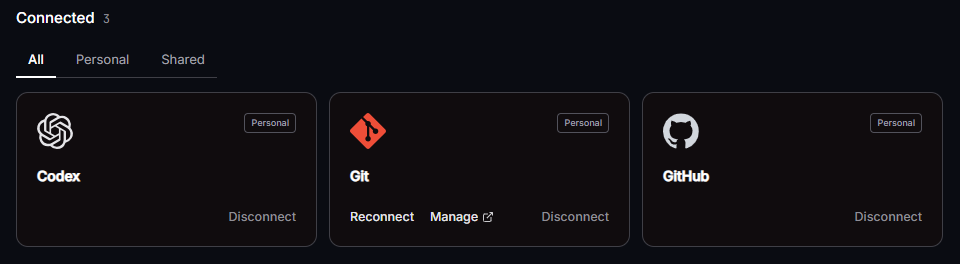
I connected the basic integrations for Git, GitHub and Codex, which again really levels up the simplicity of the VM setup, if your only using it for private use. The idea is that the machine can pull repositories, push branches, and already have Codex CLI authenticated when I log in, without extra setup.
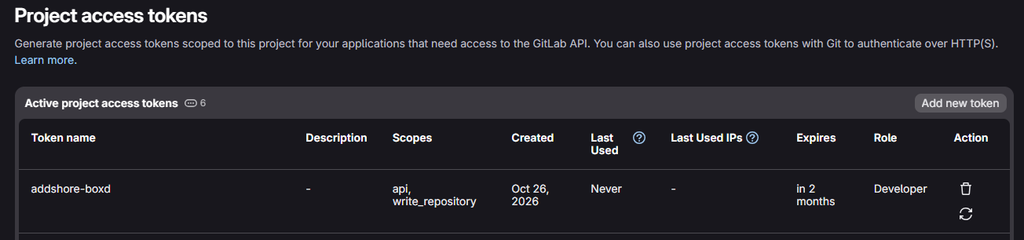
Wikimedia GitLab needed a little extra setup. I created a project access token and added it to boxd as a secret called WM_GITLAB_ADDSHORE_BOXD, scoped to gitlab.wikimedia.org. Such an option would naturally be available for basically all possible integrations, likely allowing for more fine grained control when it comes to scopes and access to other services and the outside world.

The token has an expiry and the Developer role, with api and write_repository scopes. It is scoped to this project, rather than giving the VM my normal GitLab account. Interestingly, GitLab actually represents it as a project-scoped bot user, so you can track the activity, and see the separated out actions.
Creating the machine
Heading to the machines page points you towards the CLI to create a machine. I called mine awm-1, said yes when asked whether I wanted to connect, and was straight into a shell.
~ boxd machine new
Name your machine: awm-1
    name: awm-1
      id: 20ced7dc-1c33-42cf-a361-44dc84a4ee01
     url: awm-1.boxd.sh
  source: standalone
    boot: 3ms

Connect:
  ssh       ssh awm-1.boxd
  cli       boxd machine connect awm-1
  browser   https://awm-1.boxd.sh

Connect to awm-1 now? [Y/n] yes
boxd@awm-1:~$Code language: Shell Session (shell)
The reported boot time was 3ms, which is delightful.
Checking Codex confirmed that the integration had done its job, codex was already there, and already authed.
boxd@awm-1:~$ codex login status
Logged in using ChatGPTCode language: Shell Session (shell)
Connecting Codex remotely
Next, I started remote control on the VM:
boxd@awm-1:~$ codex remote-control start
Starting app-server daemon with remote control enabled...
Installing daemon from CLI version 0.164.0 into /home/boxd/.codex/packages/app-server-daemon...
This machine is available for remote control as awm-1.
Daemon used app-server:
  path: /home/boxd/.codex/packages/app-server-daemon/current/bin/codex
  version: 0.164.0Code language: Shell Session (shell)
Then, to pair it with the app:
codex remote-control pairCode language: Bash (bash)In the desktop app, Connections → Control other devices lets you add a device using the pairing code. After doing that, awm-1 appeared as connected.
You can also do this from a mobile phone, and yes you have to do that as an additional pairing and new pairing code (everything isn’t magically connected).

In a new chat, I could then select the remote machine and send it a prompt.

You can also just use Codex CLI directly on the machine. In fact, I might try doing the whole thing from the console next time, and maybe that’ll stop me needing to switch between my personal and work OpenAI accounts in the desktop app over and over again…
Let it set itself up
My first prompt was simply:
I want you to prepare a local development environment for https://gitlab.wikimedia.org/repos/releng/cli
You should have a secretWM_GITLAB_ADDSHORE_BOXDwhich should allow you to read from that repo, and push branches in the future
Get setup and let me know how it goes
That gave Codex the repository and the name of the secret it should use, with the intention of being able to push branches later. Once the development environment was set up, I took a snapshot before giving it something more interesting to try. This is also a good point in time to note that you can snapshot the VMs, pause them, resize them and even fork them. So I am unlikely to need to do this whole setup again.
A real change: Toolviews in a Wikimedia CLI
For the actual development task, I picked something I wanted in a Wikimedia CLI: access to Toolviews, which has an API for tool traffic statistics (so that I could easily find the most used tools, and in turn see if I should add any CLI support within the tool).
We had recently added pageview metrics using the Wikimedia analytics APIs, including terminal graphs. It seemed like some of that could be reused here. There was also a small command-layout question, as tools and toolforge were aliases, and adding this functionality might mean separating them. This was all decided ahead of time by me, not left for Codex to try and figure it out (that would likely be a waste).
My prompt, typos and all, was:
I want you to take a look at https://toolviews.toolforge.org/ and the API https://toolviews.toolforge.org/api/ that as far as I can tell is currently un authenticated
I think it would be neat to include this as part of the CLI tooling!
(remember to always send the a-wikimedia-cli UA)
We recently implements pageview metrics etc based on the official wikimedia analytics APIS
Some parts of that will be reusable, such as the graphs
At a guess, the command should be under `mw tools views” or something?
Which means I think we will be splitting the tools vs toolforge alias that currently exists..!Manage Toolforge tools, jobs, builds and deployments Usage: mw tools [command] Aliases: tools, toolforgeCode language: CSS (css)So we end up with “mw tools toolviews” for example
Can you go ahead and try to implement this
The result, after a few mins, was a pushed branch and draft merge request !768.
There is not yet an Agents.md file in this repo, so I did a little bit of hand holding in terms of commit message styling, and also making sure that it ran the appropriate tests and linting checks before submission. There was also a dead part of the API that it implemented, but always returned 0s, so I got it to remove it!

And there was something useful to try in the terminal. For example, a graph of hits for the Toolviews tool itself:
mw tools toolviews toolviews --output graphCode language: Bash (bash)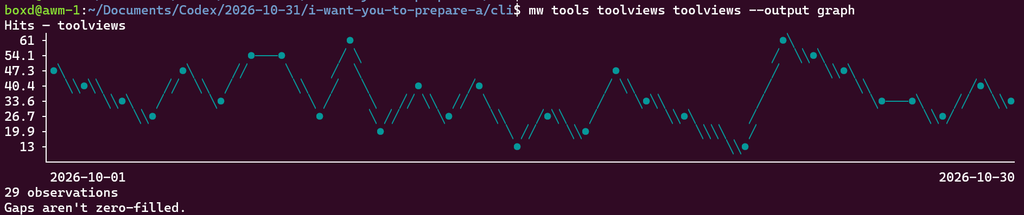
Or a table of the previous day’s tool views, now one of the examples in the command help:
mw tools views --date "$(date -d yesterday +%F)" --output table | head -n 11Code language: Bash (bash)
There are also JSON and CSV outputs too, as these all “come for free” as part of the rest of the CLI setup that I have been “refining” here for years.
This was a useful first test of the setup: get a development environment ready, work on a feature, and get the result back into GitLab as a branch and merge request. And I’ll probably end up reviewing and merging the feature for the next release today!
More to try
There is quite a bit more to boxd than I used here. Network restrictions, automatic sleeping, snapshots, machine forks and checkpoints all look interesting for development environments. Being able to save a working setup before trying something is particularly appealing when the next step is handing an agent a fairly loose brief.
I haven’t worked out an exact bill for this experiment, but I expect it to have cost pennies, as long as I remember to turn the VM off after writing this post. More importantly for me, I’ll keep trying this setup for this sort of one off easy implementation. And it’s really nice to not be tied too much into weird odd complex infrastructure (such as via devin.ai which I tried previously too).
In a work context, I’m also looking forward to exploring USB proxying through to the VM for a Raspberry Pi sitting locally, proxying COM port for development on local ESPs etc. I haven’t tried that yet, but have been working on some easy open source tooling for it.
And next time, perhaps I’ll just SSH in and use Codex in the console, rather than bringing it into the app :D That alone removes a few steps and complexity here!