I want to spend some more time developing a-wikimedia-cli (previosuly called mwcli), expanding what it can do, and adding integration tests for more of its functionality along the way. Having tests is useful, but having to wait for them every time you change something makes that slightly less appealing. Especially when your development system seems to be intense bursts of work and branches on the odd evening, or odd weekend, and not much development the rest of the time.
Some of the more involved tests create MediaWiki environments, start databases, install things, turn them off, turn them back on again and check that the CLI has done what it was supposed to. These have been running using Docker-in-Docker (or dind for short) on Wikimedia Cloud VPS machines for some time now, alongside the other checks and builds managed by Wikimedia GitLab. However the are only 2 small workers in the pool for the Docker-in-Docker tests, which are limited to 4 simultaneous jobs due to CPU and RAM constraints. not to mention it’s a waste leaving them on most of the time…
Meanwhile, the project also has a repository on GitHub which is mirrored to from GitLab, where GitHub Actions has machines quite capable of running these tests.
I have thought about moving entirely over to GitHub to solve this problem before, and have spun up forks there with CI before to make sure integration style tests pass before promoting them into branches in GitLab. However I never made a complete move. I have also dabbled with doing cross repo CI before for this setup, however it often ended in a disappointing mess.
However, maybe this time it will work *wink wink*…
A GitLab runner inside a GitHub Action
Looking back through the Git history, I had already started exploring this in October 2022, adding a GitHub workflow that could register a GitLab runner. By January 2023, I was trying to connect individual integration jobs to those runners using dynamically generated tags. GitLab would trigger GitHub, GitHub would start a runner, and the runner would pick up the appropriate GitLab job. I don’t remember much about getting this far, or exactly why I stopped. Looking at the configuration now, there were already quite a few moving parts. But it didn’t seem to make enough sense at the time.
The first working approach this weekend followed much the same idea. A GitHub workflow starts a temporary GitLab Runner on its hosted machine. That runner connects to Wikimedia GitLab, processes one job, and disconnects afterwards. The integration tests still run as GitLab jobs, with their output appearing in GitLab, but the machine doing the work belongs to GitHub. This also meant that Cloud VPS runners and GitHub-hosted runners could share the work. Whichever runner picked up a job would execute it.
There was a bit of plumbing around checking whether a worker was actually needed, avoiding duplicate dispatches, and cleaning up the temporary runner afterwards. But it worked, and the tests were considerably faster.
Ultimately after getting this mostly working, and almost being happy, I decided to throw it all away, as the approach likely makes the GitHub runners appear as doing some odd stuff, which might raise some flags. Essentially it would be hundreds of jobs that just sit there, running a gitlab runner and then exiting, with not very much output on the GitHub side. Not to mention the fact that this time around I was using a webhook from GitLab to trigger the GitHub action, but that would trigger for ALL JOBS, even if nothing needed to run on GitHub. So within an hour or so I had actually spawned thousands of CI jobs on GitHub for the project…
Going native
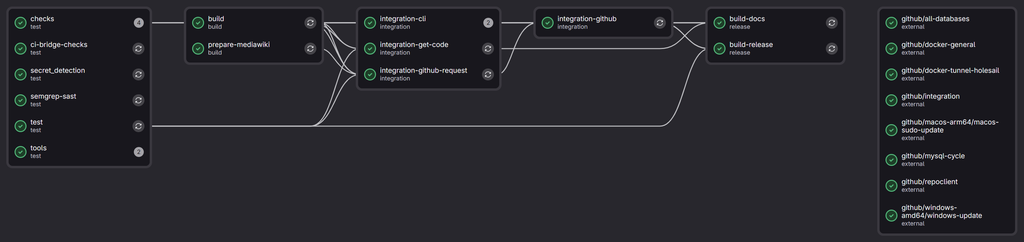
The next iteration moved the integration tests into native GitHub Actions jobs. GitLab still runs the checks (linting etc), builds the CLI binary, and prepares a MediaWiki snapshot. Once those prerequisites pass, a request job dispatches the GitHub workflow.
GitHub then downloads the inputs from that particular GitLab pipeline:
- The built
mwbinary. - The prepared MediaWiki files.
- A Git bundle containing the source being tested.
Jobs then run in parallel, covering general Docker functionality, the supported databases, the MySQL lifecycle, and a Wikibase repository/client setup. These use the GitHub machine’s Docker daemon directly.
As each finishes, a separate reporting job posts its result back to GitLab, including a link to the GitHub logs. A small waiting job in GitLab keeps downstream jobs blocked until all four tests have passed.
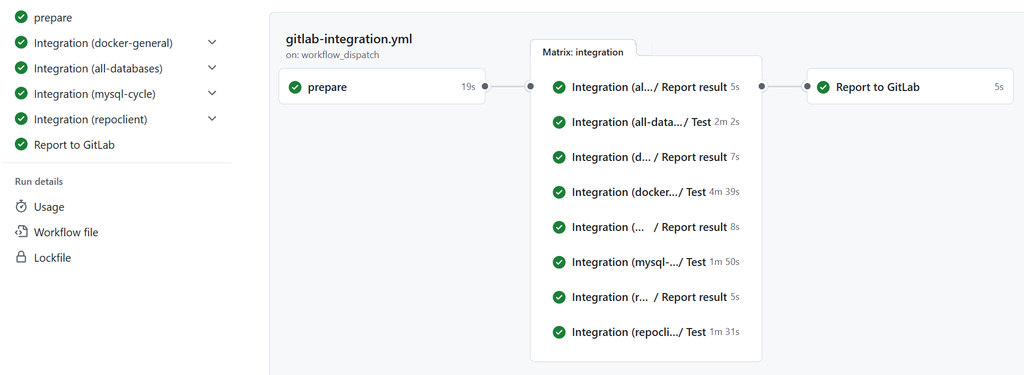
There are still Cloud VPS machines involved, but their role in this flow is dispatching work and waiting for results. The heavy Docker tests happen on GitHub. And there might be room to entirely get rid of the 2 VMs in the future, instead moving those processes to toolforge.
How much faster?
I went back through some actual pipeline timings to compare the different arrangements, as one of my other memories of experimenting in this topic before, was that GitHub actions was significantly faster.
| Integration test | September: VPS DinD | Saturday: VPS DinD | GitHub-hosted GitLab Runner | GitHub Actions |
|---|---|---|---|---|
| General Docker | 12m21s | 5m57s | 4m25s | 3m41s |
| All databases | 8m03s | 14m14s | 2m10s | 1m39s |
| MySQL lifecycle | 9m57s | 3m03s | 1m59s | 1m41s |
| Wikibase repo/client | 8m30s | 9m42s | 1m55s | 1m22s |
Job durations; queues excluded. September: median of four runs. Other setups: individual examples.
The September column uses median durations from four pipelines on 15 September. The other columns are individual example runs: Cloud VPS, GitHub-hosted GitLab Runner, and native GitHub Actions.
These are historical comparisons, with different code, caches and runner load. Preparation and caching also improved during the work, so we can’t attribute all of the difference to moving away from Docker-in-Docker. The variability on Cloud VPS is fairly visible though…
Queueing added another layer. Across the September examples, the original batches of Docker jobs took around 15–46 minutes from becoming runnable to finishing, including queue time and an initial failure in one batch, primarily down to the limitation of 4 simultaneous dind executions at once, as a single merge request or branch, or merge into main will instantly take those 4 slots, and based o the above times, they won’t be back for another 5-10 mins.
With the native setup, one complete request took around 4 minutes 21 seconds, from starting the dispatch job to GitLab receiving a successful result. That makes adding more integration coverage feel considerably more practical.
Is this allowed?
Running a GitLab runner inside a GitHub Action felt like something worth checking against GitHub’s terms, and my first check is what lead to me not actually running the GitLab runner application itself. It is an unusual-looking arrangement, even when the work being done is ordinary CI, there are no PRs on GitHub? but lots of actions?
The Actions terms restrict hosted-runner activity unrelated to the:
production, testing, deployment, or publication of the software project associated with the repository
They also address activity where the:
burden is disproportionate to the benefits provided to users
My reading is that testing, through the GitHub repository for this project fits the stated purpose. The terms don’t specifically prohibit other runner or require changes to arrive through GitHub pull requests. Using native jobs does make the purpose clearer though. Open the workflow and you can see the individual integration tests, their results, and their logs.
Windows and macOS too
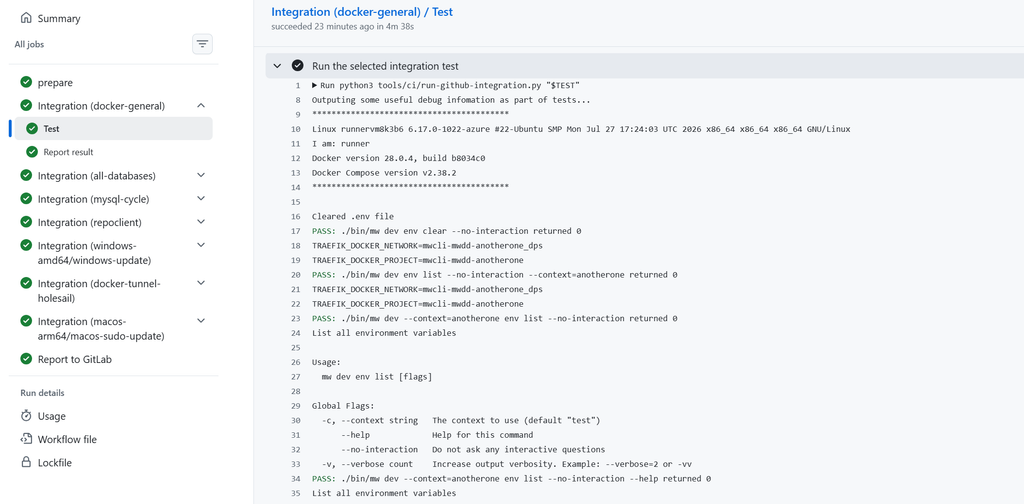
Not something I was thinking about at the start of the day, but as I was trying to tackle a backlog of tasks and bugs, many of them relate to mac, windows and arm (not somewhere the integration tests currently run). We now also have access to Windows and macOS machines, which opens up testing that the Linux Cloud VPS runners weren’t covering, and this is already in place with some first tests for initial setup and updating on windows and mac.
The integration plan lives in the GitLab configuration, listing which tests should run on which platforms. GitHub turns that into parallel jobs, checks out the exact source being tested, and runs the appropriate scripts. Adding another test can happen in the same GitLab merge request as the functionality it checks.
This is much closer to what I wanted when starting: being able to expand mwcli’s functionality alongside integration coverage for the environments people actually use.
How to?
The CI documentation covers the setup, and the workflows and helper scripts live alongside the rest of the project, and im writing this as 7a5692187b4b6d05b65d668fb6007144c25d188a is currently the HEAD of main, so your best bet will start looking there.
Next step, making GitHub a first class citizen to the project and being able to open PRs there, having GitLab CI trigger? Which in turn triggers GitHub?
CI inception! only time will tell…
For now, hopefully less waiting, more tests, and more stability…