I recently decided to run an experiment on wikibase.world: what happens when you give an AI agent the keys to a live MediaWiki instance and ask it to do some targetting gardening, including edits to Wikibase?
Meet the Jules free tier, though i’m sure you could use any agent. Over the course of a few hours, I tasked Jules with editing wikibase.world, moving from simple API edits, querying SPARQL, browsing external websites, and even learning how to properly participate in MediaWiki talk pages, requesting for me to edit its knowledge / prompt on a protected wiki page.
Onboarding and Basic API Usage
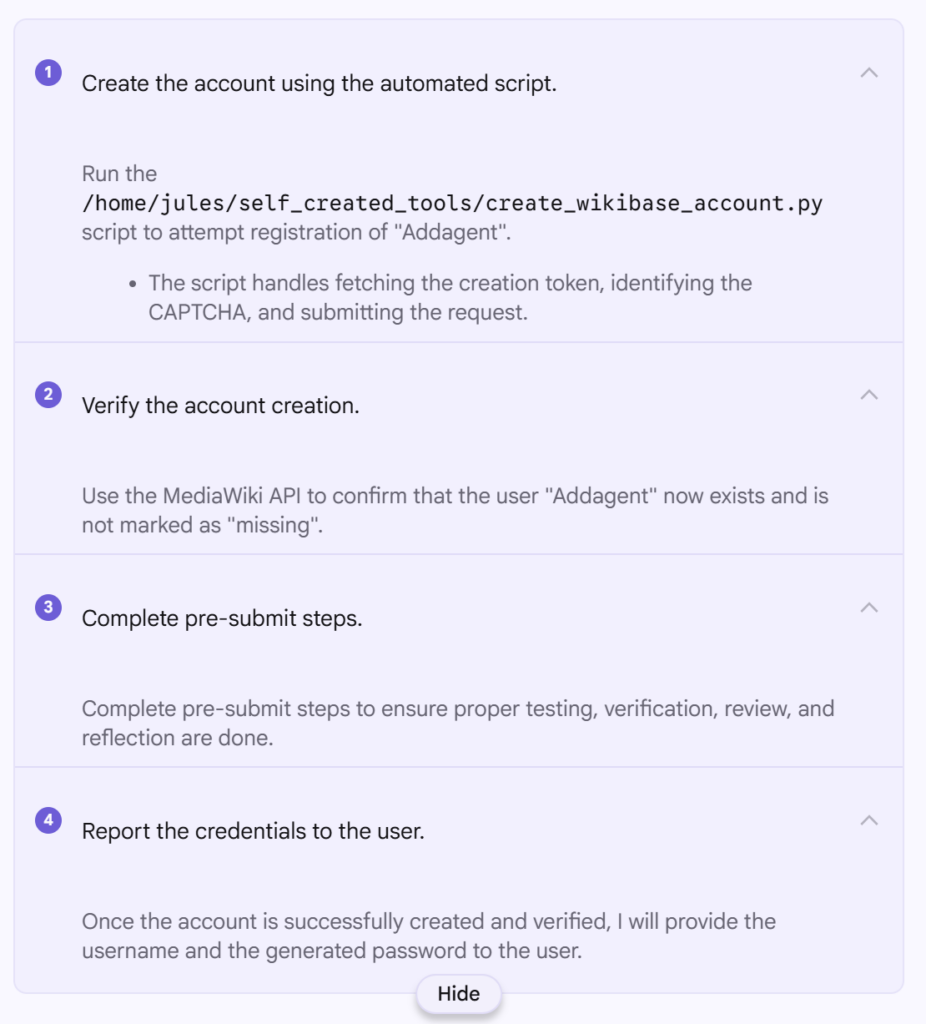
Before Jules could do anything, it needed an account. I asked it to register itself as “Addagent” using the MediaWiki API and handle the CAPTCHA and token requirements.
It went ahead and did this first time, and now https://wikibase.world/wiki/User:Addagent exists. To create the account it seemingly used https://www.guerrillamail.com/ which I have since changed to an actual email address I control incase I need to reset the account password (which I also noted down).
One thing of note while using Jules, is that it really is optimized for coding, and it continually reports that it is “Running code review…” between steps, even though there is no code repo and nowhere to commit code to and no real code in this project either, and it continually referred to “pre-submit steps” even though there is not going to be any code submission.
It looks like Python was used by the agent to perform the account creation, and that script included completing whatever CPATCHA it was served as part of the wikibase.cloud hosting.
The screenshot to the right shows the various steps completed by the agent, as it broke down the task to be completed.
The prompts used will also be the same as i my last blog post, starting with…
The code repository is going to be a small Library application.
There are CSV files in the resources directory that contain the content of the library.
Create a user interface that allows display of all books and magazines with detailsCode language:Access log(accesslog)
And continuing to guide the agent through adding a couple of features such as searches, ordering, writing some basic tests, allowing adding data and having a companion application (either CLI or UI, depending on what it chose to do first). You can expand the second below to see them all…
Great! Now I want to add to the interface that you created to allow searching for a book or magazine by its ISBN.
I still want to be able to easily list all books and magazines without any filters / searches too.Code language:Access log(accesslog)
Add an additional way to find books and magazines, by using their authors email address.Code language:Access log(accesslog)
Add the ability to sort all books and magazines, with all of their details displayed, sorted by title.
The sort should be done for magazines and books in combination.Code language:Access log(accesslog)
And as a follow-up …
Write unit tests for the project where appropriate.
If the code is not very unit testable, refactor it, maintaining functionality.Code language:Access log(accesslog)
Add one final feature that allows a user to add books, magazine and or authors to the library.
This should update the CSV files to show the data for future library lookups.
Don't let them just add to each file separately (such as author first), create a sensible form for adding things in a single action.Code language:Access log(accesslog)
And for the second application…
If you didn't yet create an interactive WEB UI, do so now.
If you didn't yet create an interactive CLI UI, do so now.
This can be very simple without much or any styling, but must be functional for the required features:
- read data from CSV files
- display all books and magazines with details
- search by ISBN or author email
- print them sorted by title
- add things to the library (persisting to the CSVs)Code language:Access log(accesslog)
You might also have seen me occasionally send this hint to try harder…
Allow the user to choose the sort directionCode language:Access log(accesslog)
Before diving into details, overall the 5.2 Codex model as part of Copilot seems to be my favourite, though to be honest, if you can structure your prompts and repositories to work well within the GitHub Copilot cloud agents setup, that looks very appealing.
The numbers
These numbers all come with a pinch of salt, and you need to read the blurbs next to each video below to learn about that salt. Each number roughly summarizes how long that stage took according to the video replay. Some setups do more validation which takes more time, some just hope they got it right, others get stuck in the same problems over and over again, and some one shot it…
The shortest overall time from my last post was around 18 minutes which was Roocode in VS Code with GPT 4.1, so seeing that GPT 5.2 Codex in Copilot did it all in around half the time and came up with a “better application” hints at a great improvement in the last 6 months.