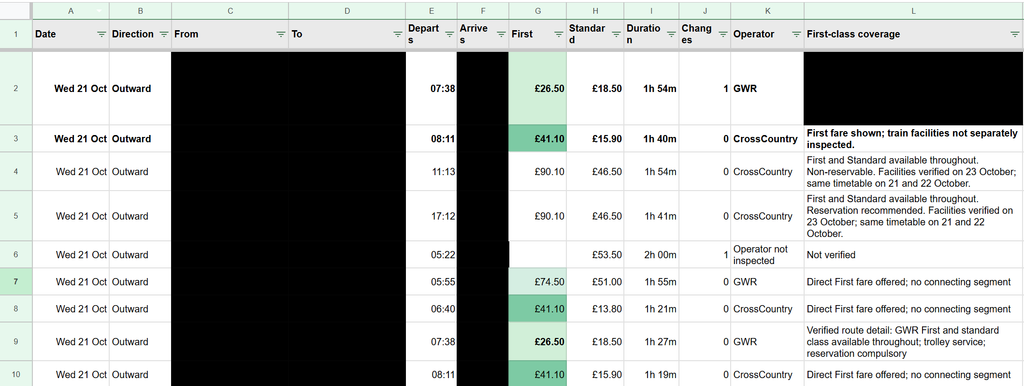
In my last post, I briefly mentioned spending part of a Sunday getting Bob, my dot, to research train tickets and collect the results in Google Sheets. There was quite a bit hidden in that sentence, time to unpack it a little, and think about how much better train ticket purchases could be if you actually want to optimize for something specific.
I had two trips to work out, some flexibility over when to travel, and an interest in reasonably priced First Class tickets (which I often see pop up, but no idea when to really expect them). I do these trips multiple times a month often on regular class tickets, and have been for the past few years, and often end up with all sorts of ticket purchases, advanced ones on the cheap, off peak returns, and many purchased last minute. I wanted to see the options without running slightly different versions of the same search myself, then trying to remember which one had produced the useful fare, over multiple days, multiple possible destination stations etc.
I’m expecting after writing this, someone might come and tell me about the perfect UK train ticket purchase and comparison website, but to my knowledge it doesn’t yet exist?
I ended up with hundreds of recorded comparisons of individual ticket prices, and four preferred direct trains costing on average £42.90 each (all for first class tickets), totaling £171 (Or £157 with split tickets). The off peak return price for these journeys would be £102.80, so only around £70 (or £50) more for 4 first class trains, which hopefully will mean that I actually get a seat on all of these trains, vs my last trip on Friday where I didn’t even get on the train as it was full…
The loose brief
The starting point was fairly ordinary. Two trips, approximate dates, one adult and no Railcard. There were three destination stations that would work for me, so fixing the search to one station would have thrown away useful options before we had even started.
The last post about AI that I wrote was about GitHub Copilot moving to AI credits, rather than their prior model of something akin to per prompt billing. That was in May, and to be honest, through June, July and August, not much seemed to change for me in the landscape for my productive working hours. (Various things changed and happened in my periphery that I might be able to explore in my personal time).
However September and October really saw another wave of changes that actually lead to impact during my working hours. From the new wave of GPT 66.1 models, to the OpenAI dots, and our increasing internal usage of Notion AI for our new internal knowledge base and task tracking, I’m seeing myself rambling on to various LLMs day in day out, and leaving more and more for them to do in the background, vs following along closely with for all of the steps (being an avid GitHub Copilot user before this).
The tides have turned, and I primarily use Codex these days as part of VsCode. With Copilot, the only model that I seem to be able to gel with well and make productive for my usage right now is GPT 5.6 Terra, auto always selects something that seems to take too much time, or perform poorly, meanwhile Codex seems to generally just get shit done, without needing so much human interaction. I imagine I’ll continue using GitHub Copilot for more hand holdy type tasks, and also for “code review” and some basic coding tasks within GitHub Copilot Cloud.
Where the “power” is really coming from in my working day now is having an AI accessible and curatable knowledge base and task tracking system, IDE integration, and consistent chat and context experiences across devices. Along with my first dot, called Bob…
Bob (the Dot)
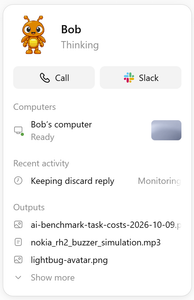
An OpenAI dot is an always-on, autonomous AI agent inside ChatGPT powered by GPT-6 Astra. I have no doubt that some folks home hosted LLM setups come close to this sort of thing (only with arguably less effective and likely slower models), however for a working setup having this as an off the shelf product is mighty powerful.
The prompts used will also be the same as i my last blog post, starting with…
The code repository is going to be a small Library application.
There are CSV files in the resources directory that contain the content of the library.
Create a user interface that allows display of all books and magazines with detailsCode language:Access log(accesslog)
And continuing to guide the agent through adding a couple of features such as searches, ordering, writing some basic tests, allowing adding data and having a companion application (either CLI or UI, depending on what it chose to do first). You can expand the second below to see them all…
Great! Now I want to add to the interface that you created to allow searching for a book or magazine by its ISBN.
I still want to be able to easily list all books and magazines without any filters / searches too.Code language:Access log(accesslog)
Add an additional way to find books and magazines, by using their authors email address.Code language:Access log(accesslog)
Add the ability to sort all books and magazines, with all of their details displayed, sorted by title.
The sort should be done for magazines and books in combination.Code language:Access log(accesslog)
And as a follow-up …
Write unit tests for the project where appropriate.
If the code is not very unit testable, refactor it, maintaining functionality.Code language:Access log(accesslog)
Add one final feature that allows a user to add books, magazine and or authors to the library.
This should update the CSV files to show the data for future library lookups.
Don't let them just add to each file separately (such as author first), create a sensible form for adding things in a single action.Code language:Access log(accesslog)
And for the second application…
If you didn't yet create an interactive WEB UI, do so now.
If you didn't yet create an interactive CLI UI, do so now.
This can be very simple without much or any styling, but must be functional for the required features:
- read data from CSV files
- display all books and magazines with details
- search by ISBN or author email
- print them sorted by title
- add things to the library (persisting to the CSVs)Code language:Access log(accesslog)
You might also have seen me occasionally send this hint to try harder…
Allow the user to choose the sort directionCode language:Access log(accesslog)
Before diving into details, overall the 5.2 Codex model as part of Copilot seems to be my favourite, though to be honest, if you can structure your prompts and repositories to work well within the GitHub Copilot cloud agents setup, that looks very appealing.
The numbers
These numbers all come with a pinch of salt, and you need to read the blurbs next to each video below to learn about that salt. Each number roughly summarizes how long that stage took according to the video replay. Some setups do more validation which takes more time, some just hope they got it right, others get stuck in the same problems over and over again, and some one shot it…
The shortest overall time from my last post was around 18 minutes which was Roocode in VS Code with GPT 4.1, so seeing that GPT 5.2 Codex in Copilot did it all in around half the time and came up with a “better application” hints at a great improvement in the last 6 months.
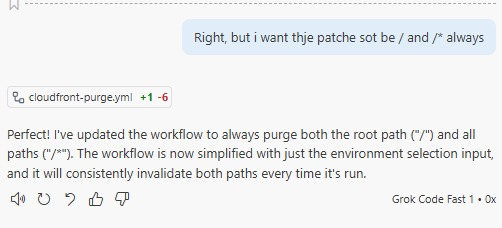
Earlier today, I sent this absolutely perfectly crafted piece of slop into GitHub Copilot…
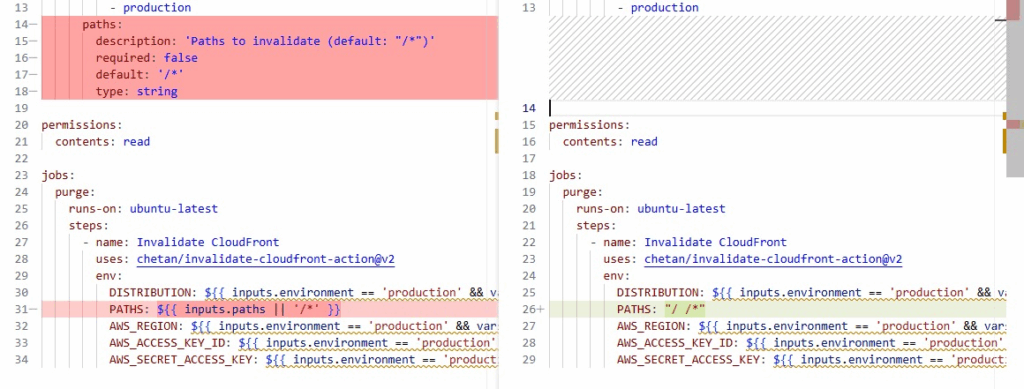
Right, but i want thje patche sot be / and /* always
And as I already expected, due to using these LLM based coding agents and assistants continually throughout their evolution, the resulting change was exactly what I wanted, despite the poor instructions.
Now, I’m sure there is actually some difference, and likely this depends on the relevance of the typoed areas, and how often such typos might also appear in training data.
If you’re reading this, and thinking about trying an IDE integrated coding agent, or thinking about switching, maybe stick around, have a read and watch some of the videos. There is at least 6 hours worth of experience wrapped up in this 20 minuite read!
I’m watching a thread on the GitHub community forums, where people are discussing how GitHub Copilot has potentially gone slightly downhill. And in some ways I agree, so I through I’d spend a little bit more time looking at the alternatives, and how they behave.
This post tries to compare 9 different setups, and will primarily look at the differences in presentation within the VS Code IDE that each of these different coding assistants have. How the default user interactions work, and how the tasks are broken down and presented to the user, and generally what the user experience is like between these different assistants.
I’ll try to flag up some other useful information along the way, such as time comparisons, amount of human interaction needed, and overall satisfaction with what the thing is doing, and if this all presents itself nicely in this post, I might find myself writing more in the future…
However, I will not be looking at cost, setup, resource usage or what’s happening with my data along the way…
I have setup this post, and the code problem in such a way that I should be able to easily add more combinations and comparisons in the future, and directly compare the performance back to this post. Ideally, at some stage I’d try some other models via Ollama, and also some other pay per requests LLM APIs…