mwcli -> a-wikimedia-cli: The start of a rebranding

Welcome to…. a Wikimedia CLI.

My involvement with what eventually became mwcli goes back to the Wikimedia Hackathon in Vienna in 2017. I put together mediawiki-docker-dev, or MWDD, to make testing MediaWiki against different combinations of PHP versions, web servers and databases easier. It gradually became a development environment that people used day to day, with a collection of Bash scripts wrapping Docker Compose. I wrote up that early history in 2021.

By May 2020, I was experimenting with a more intentional CLI around it. That prototype was written in PHP using Symfony Console, split the environment into independently controlled service groups, and reduced the number of containers needed at startup. It also made tools such as Composer, Fresh and Quibble easier to use alongside the development environment. The basic idea was still Docker Compose, with a friendlier way to manage all the moving parts.

Meanwhile, the Wikimedia Foundation’s Release Engineering team was working on a Go-based MediaWiki CLI. I began porting the MWDD functionality into that project in 2020, with the work continuing through 2021. This brought the development environment into a tool that could be distributed as a single binary, with built-in help, automated tests and regular releases. By November 2021, I could finally point existing MWDD users towards its new home under mw docker.

The wider Wikimedia scope was already starting to appear then. Alongside the development environment, mwcli had commands for GitLab, Gerrit, Codesearch and Toolhub. When I looked back at its usage in January 2025, the development environment still accounted for most recorded activity. But the ambition was to make the CLI useful across more MediaWiki and Wikimedia workflows, and I ended that post wondering whether a rename should accompany a rework, restructure and refocus.

Which brings us to a Wikimedia CLI. The development environment remains a substantial part of the project, but there is now more to discover around Wikimedia data, Toolforge, Cloud VPS and working with wiki content. After several iterations of the tooling—and quite a few years of carrying names from earlier ones—it feels like a good time to start making that broader direction more visible.
Read more

Calling GitHub CI from a Wikimedia GitLab repo

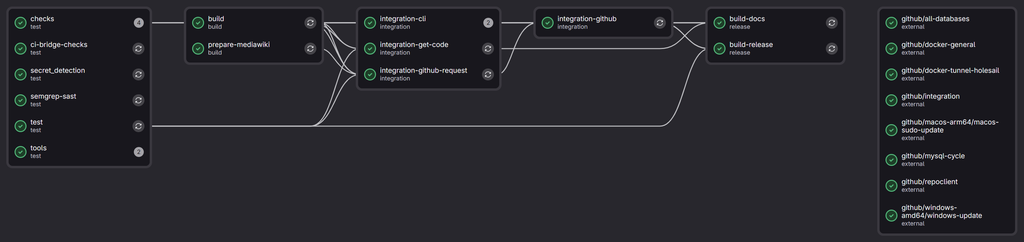
I want to spend some more time developing a-wikimedia-cli (previosuly called mwcli), expanding what it can do, and adding integration tests for more of its functionality along the way. Having tests is useful, but having to wait for them every time you change something makes that slightly less appealing. Especially when your development system seems to be intense bursts of work and branches on the odd evening, or odd weekend, and not much development the rest of the time.

Some of the more involved tests create MediaWiki environments, start databases, install things, turn them off, turn them back on again and check that the CLI has done what it was supposed to. These have been running using Docker-in-Docker (or dind for short) on Wikimedia Cloud VPS machines for some time now, alongside the other checks and builds managed by Wikimedia GitLab. However the are only 2 small workers in the pool for the Docker-in-Docker tests, which are limited to 4 simultaneous jobs due to CPU and RAM constraints. not to mention it’s a waste leaving them on most of the time…

Meanwhile, the project also has a repository on GitHub which is mirrored to from GitLab, where GitHub Actions has machines quite capable of running these tests.

I have thought about moving entirely over to GitHub to solve this problem before, and have spun up forks there with CI before to make sure integration style tests pass before promoting them into branches in GitLab. However I never made a complete move. I have also dabbled with doing cross repo CI before for this setup, however it often ended in a disappointing mess.

However, maybe this time it will work *wink wink*…

Read more

Researching UK train tickets with an AI agent

In my last post, I briefly mentioned spending part of a Sunday getting Bob, my dot, to research train tickets and collect the results in Google Sheets. There was quite a bit hidden in that sentence, time to unpack it a little, and think about how much better train ticket purchases could be if you actually want to optimize for something specific.

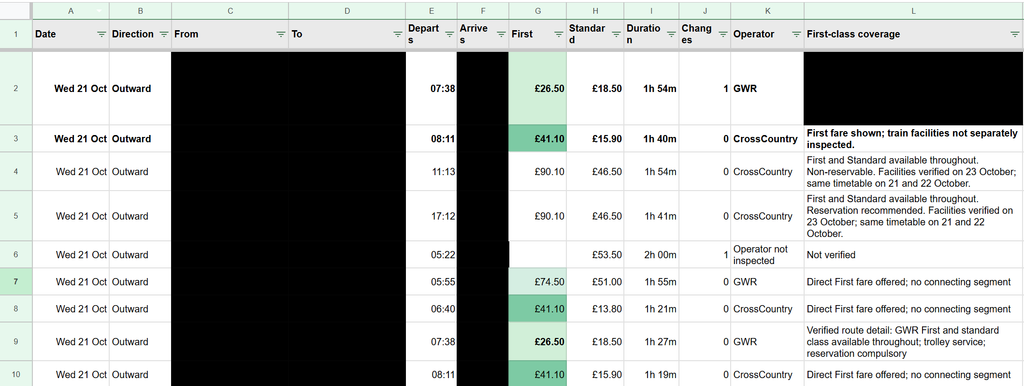
I had two trips to work out, some flexibility over when to travel, and an interest in reasonably priced First Class tickets (which I often see pop up, but no idea when to really expect them). I do these trips multiple times a month often on regular class tickets, and have been for the past few years, and often end up with all sorts of ticket purchases, advanced ones on the cheap, off peak returns, and many purchased last minute. I wanted to see the options without running slightly different versions of the same search myself, then trying to remember which one had produced the useful fare, over multiple days, multiple possible destination stations etc.

I’m expecting after writing this, someone might come and tell me about the perfect UK train ticket purchase and comparison website, but to my knowledge it doesn’t yet exist?

I ended up with hundreds of recorded comparisons of individual ticket prices, and four preferred direct trains costing on average £42.90 each (all for first class tickets), totaling £171 (Or £157 with split tickets). The off peak return price for these journeys would be £102.80, so only around £70 (or £50) more for 4 first class trains, which hopefully will mean that I actually get a seat on all of these trains, vs my last trip on Friday where I didn’t even get on the train as it was full…

The loose brief

The starting point was fairly ordinary. Two trips, approximate dates, one adult and no Railcard. There were three destination stations that would work for me, so fixing the search to one station would have thrown away useful options before we had even started.

Read more

I’m here to ramble (about AI ‘n stuff): a look at the last few months

The last post about AI that I wrote was about GitHub Copilot moving to AI credits, rather than their prior model of something akin to per prompt billing. That was in May, and to be honest, through June, July and August, not much seemed to change for me in the landscape for my productive working hours. (Various things changed and happened in my periphery that I might be able to explore in my personal time).

However September and October really saw another wave of changes that actually lead to impact during my working hours. From the new wave of GPT 6 6.1 models, to the OpenAI dots, and our increasing internal usage of Notion AI for our new internal knowledge base and task tracking, I’m seeing myself rambling on to various LLMs day in day out, and leaving more and more for them to do in the background, vs following along closely with for all of the steps (being an avid GitHub Copilot user before this).

The tides have turned, and I primarily use Codex these days as part of VsCode. With Copilot, the only model that I seem to be able to gel with well and make productive for my usage right now is GPT 5.6 Terra, auto always selects something that seems to take too much time, or perform poorly, meanwhile Codex seems to generally just get shit done, without needing so much human interaction. I imagine I’ll continue using GitHub Copilot for more hand holdy type tasks, and also for “code review” and some basic coding tasks within GitHub Copilot Cloud.

Where the “power” is really coming from in my working day now is having an AI accessible and curatable knowledge base and task tracking system, IDE integration, and consistent chat and context experiences across devices. Along with my first dot, called Bob…

Bob (the Dot)

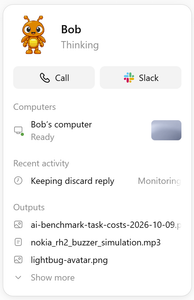
An OpenAI dot is an always-on, autonomous AI agent inside ChatGPT powered by GPT-6 Astra. I have no doubt that some folks home hosted LLM setups come close to this sort of thing (only with arguably less effective and likely slower models), however for a working setup having this as an off the shelf product is mighty powerful.

Read more